


TimeClock Plus Clock
4.9411.00 Reviews
App Specs
- Version
- 1.43.0
- Updated On
- License
- Free
- Downloads
- 100,000+
- Developer
- TimeClock Plus, LLC
- Categories
- Business
- Platform
- Android
Screenshots
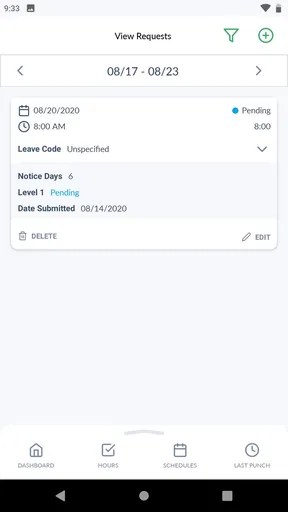
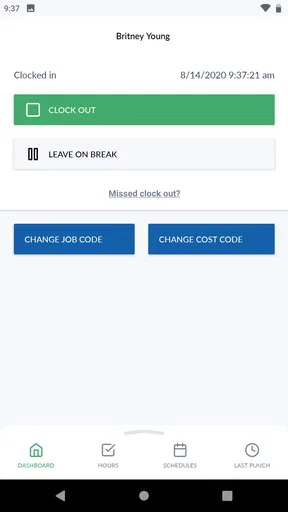
 Analysis by AppCompare
Time tracking is easy to appreciate during the first few days of a new job, a busy project, or a shift-based schedule. The harder question is whether the habit remains useful once the novelty disappears. After spending time with TimeClock Plus Clock, I see it as a focused business app that earns its place when a team needs a consistent way to record working time without turning the process into a daily chore.
The app comes from TimeClock Plus, LLC and is available free of charge for everyone. It belongs to the business category rather than trying to be a broad personal productivity suite. That narrow purpose is important: this is most useful when an employer, manager, or team already has a timekeeping process and wants employees to use their phones while moving between work locations.
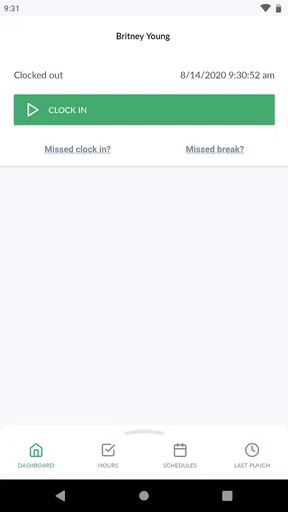
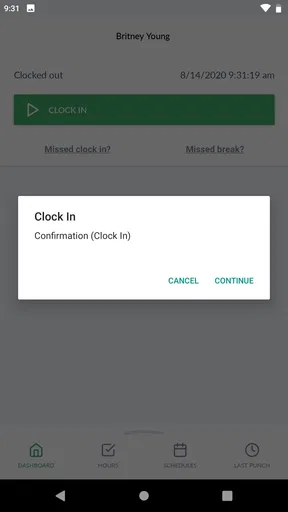
Its store summary focuses on easy and accurate tracking for teams on the go, and that description matches the central experience. The appeal is not a large collection of distractions or decorative tools. The appeal is having a clear place to handle clock-in and clock-out tasks when a computer or traditional time terminal is inconvenient.
What makes the first week appealing
During the first week, the strongest benefit is reduced friction. A mobile time clock fits the rhythm of people who do not stay at one desk all day. Someone arriving at a worksite, moving between appointments, or beginning a shift away from headquarters can use the phone already in their hand instead of searching for a shared terminal.
That convenience matters because timekeeping usually fails at the edges of a workday. People remember the start of a shift but forget to record the end, or they postpone the task until several hours later and then have to reconstruct what happened. A dedicated clocking app encourages a simple routine: open it at the transition point, complete the action, and get on with the day.
I also like the psychological clarity of using a specialized app instead of a general notes app or spreadsheet. A note saying “started at nine” may look sufficient, but it creates extra work for whoever has to interpret, organize, and approve the record later. A purpose-built clock helps keep the action connected to the team’s established timekeeping workflow.
The first-week experience is especially convincing for employees who work irregularly. A fixed office worker may not gain much from mobile clocking, but a field worker, rotating staff member, or person covering several sites can benefit immediately. In those situations, the phone is more available than a desktop, and the timekeeping action can happen where the shift actually begins.
Worth Reading Before You Choose

EA SPORTS FC Mobile 26 Is a Bigger Football Game, but It Takes Time

Flipboard Shows What News Apps Must Do Beyond the Feed

Switching to Android Auto Means Rethinking Your Driving Routine

Google Calendar Makes a Crowded Week Easier to Manage

Ludo King Makes the Most of the Minutes Between Plans

Baby Panda World Brings Quick Play to Modern Phones, but Its Game Library Feels Busy
There is also a useful social effect. When everyone follows the same basic routine, managers spend less time chasing handwritten notes or asking people to clarify when they worked. That does not eliminate every payroll question, but it can make the initial record easier to create and easier to discuss.
A realistic day with the app
Imagine a technician who starts the morning at one location, spends the afternoon at another, and finishes the day away from the office. With a conventional punch terminal, the first and last actions may require an unnecessary detour. With a mobile clock, the technician can make timekeeping part of the natural arrival and departure routine.
The important point is not that the app magically solves attendance administration. It is that it places the time entry closer to the event being recorded. That reduces reliance on memory. If a correction is still needed, the employee and manager are discussing a specific shift rather than trying to rebuild an entire week from vague recollection.
For a small team, this can feel like a meaningful upgrade over paper sheets. Paper is familiar, but it is easy to misread, misplace, or complete in batches. A spreadsheet can be flexible, yet it often depends on careful formatting and someone remembering to maintain it. TimeClock Plus Clock is more appropriate when the organization wants employees to perform a defined clocking action instead of editing a shared document.
Where the early appeal stops
The first-week benefit depends on the team’s existing setup. An employee cannot judge the app in isolation if the employer has not established how it should be used, what to do after a missed clocking action, or who handles corrections. The software may make recording easier, but workplace rules still determine whether the record is useful.
That is the first limitation I would explain to a friend. This is not a magic replacement for communication. If managers give unclear instructions, employees may still wonder whether they should clock before entering a site, after preparing equipment, or when a scheduled shift officially begins. The app can support a process; it cannot define a fair process for the organization.
Another early source of friction is the phone itself. A dead battery, poor connectivity, an outdated device, or simple forgetfulness can interrupt the routine. A mobile time clock is convenient precisely because it travels with the worker, but that also means the worker must keep the device available and usable at the right moment.
Why it can remain useful month after month
Long-term value comes from repetition, not excitement. After the first week, nobody is opening a time clock app for entertainment. The question becomes whether it quietly improves the reliability of everyday records. In my view, that is where this app has a reasonable case: its usefulness grows when the team treats it as a small, predictable part of every shift.
A recurring timekeeping habit can help separate actual work records from memory and guesswork. That is valuable for employees who want to check their own routine and for managers who need a consistent basis for reviewing attendance. The benefit is practical rather than dramatic, but practical tools often last longer than feature-heavy apps that demand attention.
The app has a strong fit for organizations with people regularly away from desks. It is less compelling for a very small group that works in one room and already has a reliable shared clock. In that setting, a physical process may be faster because everyone uses the same device and no one has to manage individual phones.
It also makes more sense when the organization already uses the TimeClock Plus environment or expects a centralized approach to time records. The developer’s identity is part of the product’s context: this is not a random stopwatch with a business label, but a mobile-facing tool associated with a company focused on workforce time management. That makes it easier to consider as part of a broader workplace process rather than as a standalone personal timer.
For personal freelancers, the value is more limited. A freelancer may prefer a project timer that separates clients, tasks, billable work, and notes in one place. TimeClock Plus Clock is better suited to recording attendance or shift time for a team than to building a detailed personal invoice trail. Choosing it for the wrong job would make it feel unnecessarily narrow.
The trade-off against familiar alternatives
Compared with paper, the app offers a more immediate and portable routine, but paper may still win where phones are discouraged or unavailable. Compared with a spreadsheet, it should feel more purpose-built for clocking, while a spreadsheet remains better for custom calculations and unusual reporting. Compared with a personal timer, it is more relevant to shared workplace attendance, but less attractive for someone tracking several independent projects.
That distinction prevents a common disappointment. If you want a flexible work diary, this is probably not the best category to start with. If you want a team-oriented clocking tool that employees can carry to different locations, its focused design becomes an advantage rather than a weakness.
One non-obvious trade-off is that standardization can be both helpful and restrictive. A shared process reduces creative interpretations of how time should be entered, which is good for consistency. At the same time, workers with unusual schedules may need clear guidance from their employer because a simple clocking routine does not automatically explain split shifts, travel time, training, or corrections. The app is strongest when the surrounding policy is already understandable.
What the public response suggests
TimeClock Plus Clock has an average rating of 4.9 from around four thousand six hundred ratings, with more than four hundred written reviews and over one hundred thousand installs. Those numbers suggest that the basic experience has connected with a substantial group of users, especially people looking for a straightforward business timekeeping tool rather than a broad productivity platform.
I would still avoid treating a high average as a guarantee for every workplace. Time-clock apps are unusually dependent on employer configuration, staff training, and local routines. A person who uses it under a clear policy may find it simple, while another person may blame the app for confusion that actually comes from inconsistent instructions. The rating is encouraging, but the fit of the work process matters more than the headline number.
Maintenance: what keeps the habit healthy
The maintenance burden is relatively low when the app is used for one repeated action, but “low” does not mean zero. The team still needs a routine for checking that employees are clocking at the expected times and for addressing mistakes promptly. If corrections accumulate until the end of a pay period, the convenience of mobile entry starts to lose some of its value.
I would recommend that managers introduce a short, written rule for the first week: when to clock in, when to clock out, what to do after forgetting, and whom to contact when something looks wrong. This small amount of preparation is more valuable than asking employees to discover the process through trial and error.
Employees should also make the clocking action part of a physical habit. For example, clocking in can happen immediately after arriving at the work area, while clocking out can happen before leaving rather than after getting home. The closer the action is to the event, the less likely it is to be reconstructed later.
Device upkeep matters too. Keeping the phone charged, allowing the app to remain easy to find, and checking for a current release are ordinary maintenance steps, but they protect the very convenience that makes mobile timekeeping attractive. The current version is 1.43.0, and the app supports devices running Android 7.0 or later, so compatibility should be checked before a company standardizes on it across older phones.
That operating-system requirement is not a problem for many users, but it can matter in workplaces that keep phones for several years. A manager planning a broad rollout should test the oldest devices in the group instead of assuming every phone will behave alike. This is a practical deployment detail, not an issue most individual shoppers think about before downloading.
Keeping records useful rather than merely complete
A complete record is not automatically a good record. If someone clocks in correctly but regularly forgets to clock out, the organization still has an administrative problem. The lasting value of the app depends on reviewing patterns and resolving exceptions while the details are fresh.
For employees, a useful personal habit is to glance at the day’s status before moving on from work. That quick check can catch an accidental omission earlier than a later payroll review. For supervisors, a brief recurring review is preferable to a large end-of-period cleanup because questions are easier to answer when the shift is recent.
This is one of the app’s less glamorous lessons: the software can make entry easier, but people must maintain the habit. If the team treats it as optional, the organization ends up with a digital version of an incomplete paper sheet. If everyone treats it as part of starting and ending work, the app becomes almost invisible, which is exactly the kind of lasting value I want from a utility.
Where fatigue begins over time
The main fatigue comes from repetition when the workflow does not feel dependable. Employees may become irritated if they are repeatedly asked to correct entries, if instructions change, or if the app is introduced without explaining why the process matters. Even a simple clocking action feels burdensome when it is surrounded by uncertainty.
There is also the emotional fatigue of constant accountability. Timekeeping is not just a personal reminder; it can affect payroll, attendance discussions, and a manager’s view of a workday. A mobile app makes the act more immediate, which is useful, but some workers may feel that every transition is being formalized. Employers should communicate the purpose clearly and avoid turning minor mistakes into a source of unnecessary pressure.
Another limitation is the dependence on a mobile device. Phones are personal, distracting, and sometimes restricted in certain environments. A warehouse, clinical setting, secure facility, or job involving protective equipment may not be a place where pulling out a phone is convenient. In those cases, a shared terminal, badge system, or other workplace-specific method may be better.
People who do not carry compatible phones should not be treated as an afterthought either. Because the app supports Android 7.0 and later, older or unsupported devices can become a practical obstacle. A team should decide on an alternative procedure before launch rather than discovering the issue when someone cannot clock in.
Fatigue can also come from expecting the app to answer policy questions it was never meant to answer. Whether travel counts as work, how breaks are handled, or how split schedules are recorded are organizational decisions. If those decisions are vague, the app becomes the visible point of frustration even though the underlying problem is process design.
Who should think twice before choosing it
I would not lead with this app for someone seeking detailed project accounting, client billing, personal productivity analysis, or a rich work journal. A dedicated project timer or spreadsheet may provide more useful detail in those cases. I would also hesitate for a team that already has a dependable on-site clock and rarely works away from it.
It may be a poor fit for a workforce with limited phone access, very old devices, or strict rules against using personal phones during shifts. In such environments, convenience for one group can create unfairness for another. The right solution is the one every employee can use consistently, not simply the one that looks easiest in a download screen.
Finally, organizations that want extensive customization should evaluate their needs carefully before committing. This app’s strength is focus. That same focus means it should not be selected merely because it is free. Free removes a purchase barrier, but it does not remove the work of defining procedures, supporting employees, and checking records.
My long-term verdict
TimeClock Plus Clock earns lasting space on a phone when the user is part of a team that needs mobile time tracking and has a clear policy around it. Its free price, Everyone content rating, and focused business purpose make it approachable, while the strong average rating and broad install base show that the basic idea has found a receptive audience.
What I appreciate most is its potential to become boring in the best possible way. Once the first-week novelty fades, a time clock should not demand much thought. It should support a repeatable arrival-and-departure habit, reduce dependence on memory, and give the workplace a more consistent starting point for handling time records.
My recommendation comes with a condition: judge the complete workflow, not only the app. Before adopting it, confirm that the team understands clock-in timing, missed entries, device compatibility, and the person responsible for corrections. Those details decide whether the app feels like a useful shortcut or another administrative obligation.
For mobile teams, rotating staff, and employers trying to move away from paper-based time sheets, I think it is worth trying. For freelancers, desk-bound groups with a good physical clock, or organizations wanting deep project tracking, I would choose a different kind of tool. The lasting value here is consistency, not feature abundance. If your workplace can build that consistency into the daily routine, this app has a realistic chance of remaining useful long after the initial download.
Pros
- Simple clock-in and clock-out process for everyday shifts.
- Supports location-based verification for added attendance accuracy.
- Helps reduce manual timesheet errors and duplicate entries.
- Useful for teams with changing schedules and multiple work locations.
- Time entries can be reviewed before payroll processing.
Cons
- Some features may require employer configuration or administrative approval.
- Location tracking can raise privacy concerns for employees.
- The interface may feel less intuitive on smaller phone screens.
- Clock-ins can be affected by weak GPS or unreliable network coverage.
- Not very useful for individuals without an organization account.
FAQs for TimeClock Plus Clock
What is TimeClock Plus Clock used for?
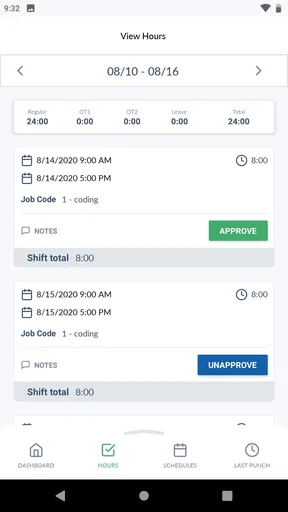
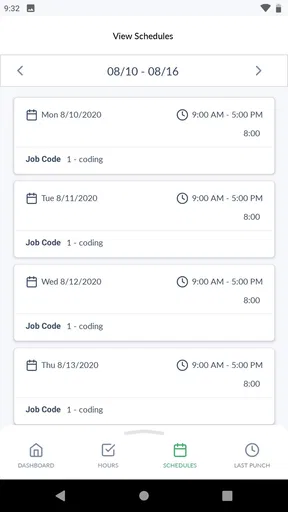
TimeClock Plus Clock is a workforce time-tracking app designed to let employees clock in and out, review their recorded hours, and manage attendance from a mobile device. Depending on the organization’s setup, it may also support breaks, job or department selection, location verification, schedules, and timesheet information. Its available features can vary because employers usually configure the app according to their payroll and attendance policies.
How do I log in to TimeClock Plus Clock?
To use TimeClock Plus Clock, you generally need credentials provided by your employer or organization, such as a username, password, company code, or an organization-specific sign-in method. Some workplaces may use single sign-on or additional verification. If you cannot access your account, the app itself may not be able to resolve the issue; contacting your manager, payroll department, or system administrator is usually the fastest way to confirm your login details.
Can TimeClock Plus Clock track my location?
Location tracking depends on the settings selected by your employer and the permissions granted on your Android or iOS device. Some organizations may use location services or geofencing to confirm that clock-ins and clock-outs occur at an approved workplace, while others may not require location data. Before downloading and using the app, review its permission requests and your employer’s privacy policy so you understand when location information may be collected.
What should I do if my clock-in or clock-out does not work?
If a punch fails, first check that you have an internet connection, the app is updated, and your device’s date, time, and required permissions are correct. Try reopening the app and signing in again, but avoid repeatedly submitting a punch because this could create duplicate records. If the problem continues, record the exact time and contact your supervisor or administrator so the attendance entry can be corrected according to workplace procedures.
Is TimeClock Plus Clock free to download and use?
The app may be available to download without an upfront charge, but access is normally connected to an organization that uses TimeClock Plus workforce-management services. Employees typically do not purchase an individual subscription through the app, although pricing and account availability are determined by the employer’s contract. Some features may also depend on the organization’s plan, configuration, device permissions, and internal attendance policies.


